
Domain Customization
Learn how to use a custom domain with Scalekit
Custom domains enable you to offer a fully branded experience. By default, Scalekit assigns a unique endpoint URL, but you can replace it via CNAME configuration. The custom domain also applies to the authorization server URL shown on the OAuth consent screen during MCP authentication — users will see your branded domain instead of the auto-generated yourapp-xxxx.scalekit.com.
| Before | After |
|---|---|
https://yourapp.scalekit.com | https://auth.yourapp.com |
- Environment: CNAME configuration is available only for production environments
- SSL: After successful CNAME configuration, an SSL certificate for your custom domain is automatically provisioned
Set up your custom domain
Section titled “Set up your custom domain”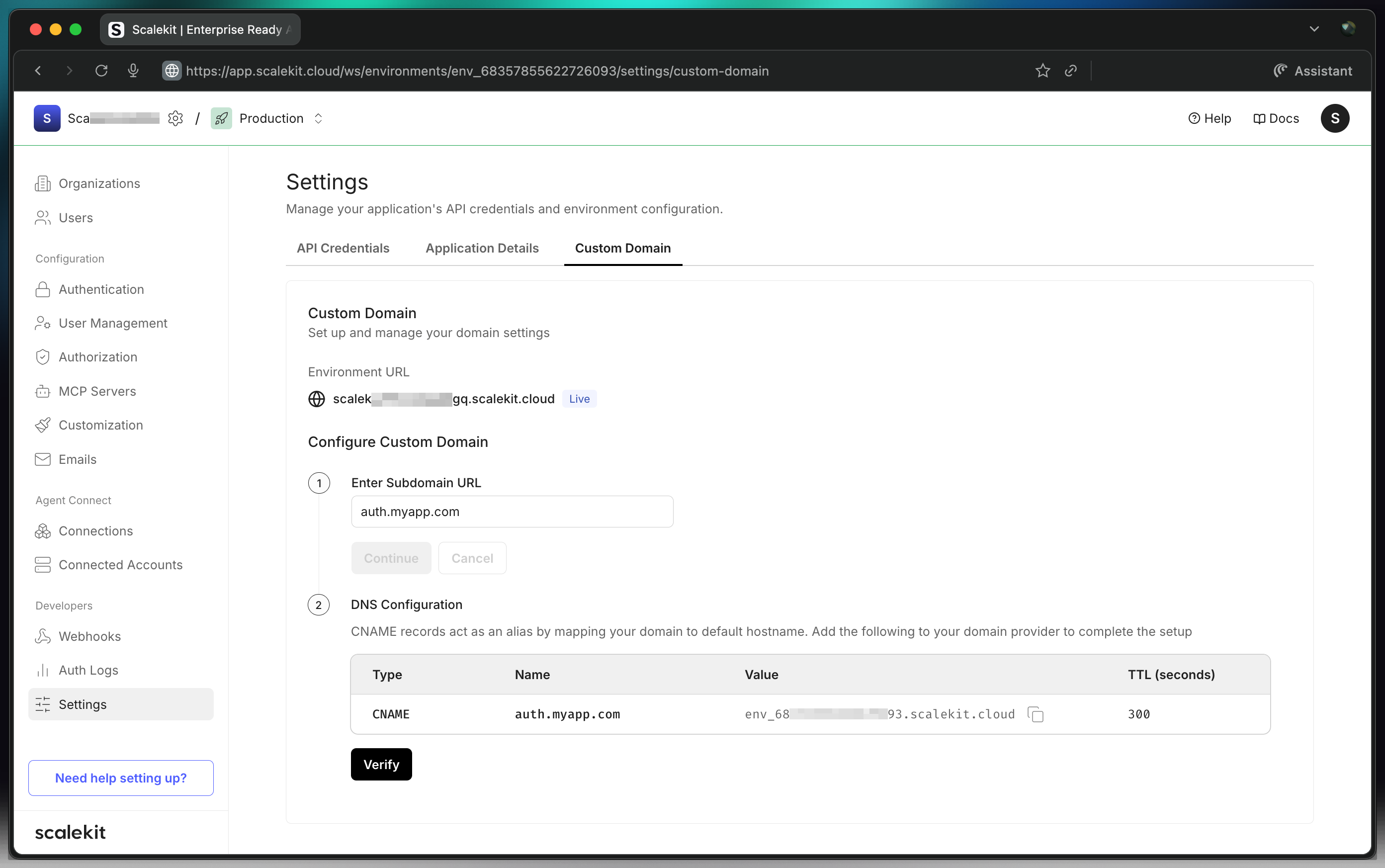
To set up your custom domain:
- Go to your domain’s DNS registrar
- Add a new record to your DNS settings and select CNAME as the record type
- Switch to production environment in the Scalekit dashboard
- Copy the Name (your desired subdomain) from the Scalekit dashboard > Settings > Custom domains and paste it into the Name/Label/Host field in your DNS registrar
- Copy the Value from the Scalekit dashboard > Settings > Custom domains and paste it into the Destination/Target/Value field in your DNS registrar
- Save the record in your DNS registrar
- In the Scalekit dashboard, click Verify
CNAME record changes can take up to 72 hours to propagate, although they typically happen much sooner.
Troubleshoot CNAME verification
Section titled “Troubleshoot CNAME verification”If there are any issues during the CNAME verification step:
- Double-check your DNS configuration to ensure all values are correctly entered
- Once the CNAME changes take effect, Scalekit will automatically provision an SSL certificate for your custom domain. This process can take up to 24 hours
You can click on the Check button in the Scalekit dashboard to verify SSL certification status. If SSL provisioning takes longer than 24 hours, please contact us at support@scalekit.com
DNS registrar guides
Section titled “DNS registrar guides”For detailed instructions on adding a CNAME record in specific registrars: